




403
Sorry!!
Error! We're sorry, but the page you were looking for doesn't exist.
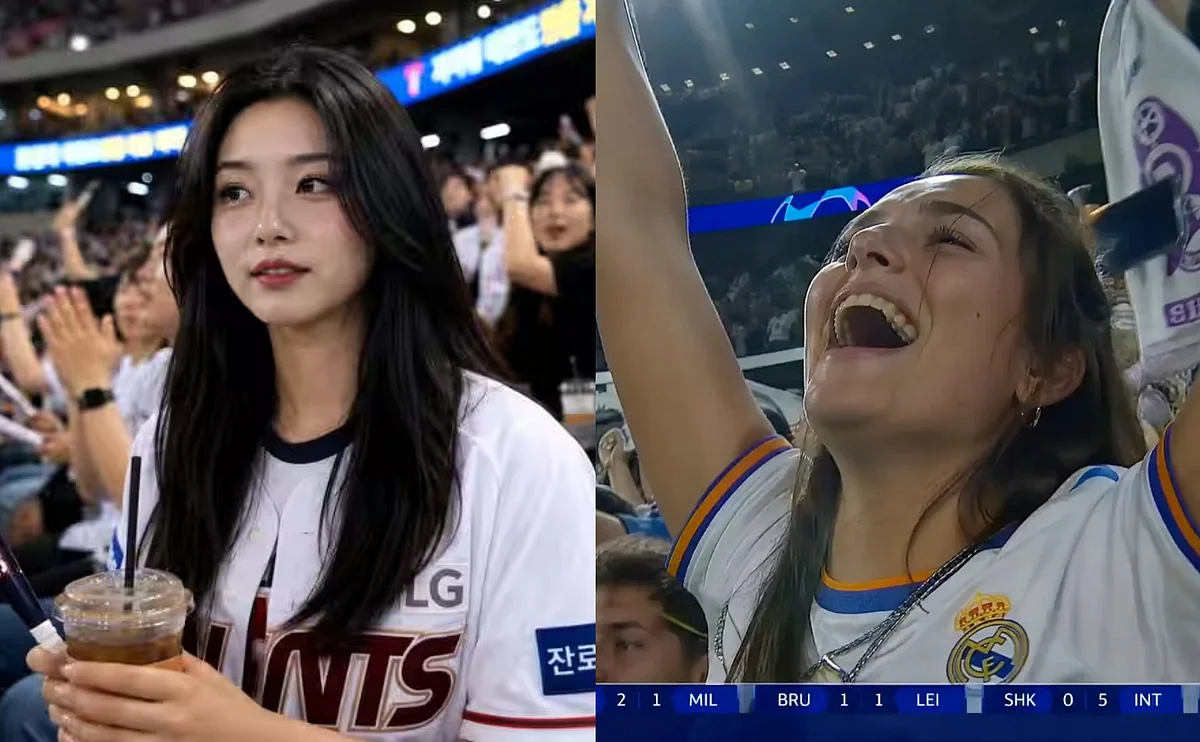
Go Viral: How To Create Your Own AI Stadium Video Like The Korean Trend
(MENAFN- Khaleej Times) If your social media feed has been flooded with suspiciously cinematic clips of people casually spotted on stadium broadcast cameras, you are not imagining things.
The trend began when a user on X posted a five-second clip of a young woman watching a Korean baseball game. The video racked up over 15 million views before people realised she was entirely AI-generated. Since then, everyone wants in, and the good news is it is surprisingly easy to do yourself.
Stay up to date with the latest news. Follow KT on WhatsApp Channels.
Recommended For YouHere's a step-by-step guide with prompts to help you generate that video of yourself in your favourite stadium. I used El Clásico as a reference because I am a Barcelona fan, but feel free to experiment with your favourite sport and teams.
Step 1: Generate your stadium photo
Start with a clear, well-lit selfie. Upload it to an AI image generator - ChatGPT, Google Gemini, or MyEdit's AI Image Generator all work. Then use a prompt like this one, which places you in the stands at El Clásico:
“Use the uploaded reference image as the strongest identity anchor. The person must look like the exact same person from the reference image. Preserve their exact facial identity with high priority: same face shape, same eyes, same nose, same lips, same skin tone, same expression style, same hair. Create an ultra-realistic candid El Classico broadcast screenshot of this person accidentally caught by a live TV camera in the spectator seats. Important: Their face should remain close to the reference image. Do not change them into another person. They are seated among a lively crowd of Barcelona fans, holding an iced drink and a cheering stick, wearing a clean white baseball jersey over a casual top. They notice the camera and give a small natural smile, slightly surprised but composed. Use a realistic broadcast camera look: telephoto compression, mild video softness, slight motion blur in the crowd, stadium lighting, natural skin texture, imperfect candid framing, 16:9 horizontal TV broadcast composition. Background: crowded football stadium seats, cheering fans, bright stadium lights, LED boards softly out of focus.”
Swap out the match, outfit, or team to your liking.
Step 2: Animate it into a video
Once you have a photo you are happy with, head to MyEdit's Image to Video tool or Google's Flow. Upload your generated image as the first frame, then use a prompt like this:
"Preserve exact face, hairstyle, skin texture, and identity. Do NOT stylize or beautify. Output: single continuous live sports broadcast shot, 4-5s, 16:9, 1080p, no cuts.
SUBJECT: A person based on @image1, sitting in a football stadium audience for an El Classico match. Looking directly at the camera with a bright, genuine smile. Waving happily and enthusiastically towards the lens. Energetic, relaxed, and joyful body language.
ENVIRONMENT: Lively and festive football stadium crowd during a high-energy live game. The background crowd is highly active, cheering, clapping, and waving team towels or thundersticks. Plastic seats, fans around wearing vibrant team jerseys. Background slightly out of focus; realistic stadium lighting; slight haze from broadcast compression.
MOOD: Excited, joyful, classic interactive Jumbotron Fan Cam moment. High energy, real broadcast capture. No cinematic drama. Pure live TV entertainment.
CAMERA: Telephoto broadcast lens (120-150mm). Long-distance zoom from upper stands camera targeting the subject. Strong compression, shallow depth of field. Eye-level, very slight upward tilt. Subtle micro-shake from broadcast stabilization.
ACTION (4-5s): [0-1s] Realizes they are on camera, face lights up with a big, happy smile. [1-3s] Makes direct eye contact, raises hand(s) and waves enthusiastically at the lens. [3-5s] Continues waving and laughing naturally, while the background crowd actively cheers and jumps slightly.
DETAILS: Direct eye contact with the camera. Skin texture realistic, no smoothing. Slight motion blur on the background crowd. Faint broadcast scoreboard UI or "LIVE" graphic visible in the corner."
Select Kling 3.0 if available. It handles facial consistency and crowd motion better than older models. Adjust the aspect ratio and model settings as needed, then generate.
Step 3: Download and post
Hit download, add a caption like "I got caught on camera at the stadium..." and watch the comments roll in.
Want to know more about your favourite tech products in the UAE? Check out the links below or click here to see Khaleej Times' coverage on technology.
ALSO READ- Spot deepfakes: How to avoid AI scams and protect your money AI-generated 'Fruit Love Island' takes TikTok by storm

Legal Disclaimer:
MENAFN provides the
information “as is” without warranty of any kind. We do not accept
any responsibility or liability for the accuracy, content, images,
videos, licenses, completeness, legality, or reliability of the information
contained in this article. If you have any complaints or copyright
issues related to this article, kindly contact the provider above.
Most popular stories
Market Research

More Story







Comments
No comment