








403
Sorry!!
Error! We're sorry, but the page you were looking for doesn't exist.
4Ddig Introduces Windows Boot Genius Its New Multifunctional Windows Tool
(MENAFN- Send2Press Newswire)
NEW YORK, N.Y., Sept. 6, 2022 (SEND2PRESS NEWSWIRE) — Windows update is necessary, but sometimes it comes with a black screen, a system stuck in repair mode or an operating system breakdown. Here Tenorshare 4DDiG comes to the rescue with its newly launched Windows Boot Genius. No matter what OS problems, booting issues, or other computer problems arise, it provides users with all kinds of practical solutions.
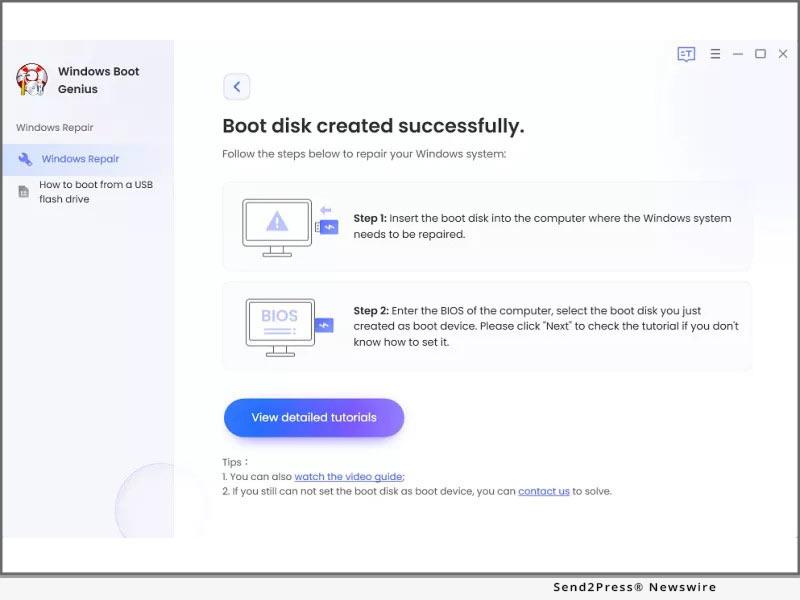
Image Caption: 4DDiG Introduces Windows Boot Genius.
Windows Boot Genius Features
Windows boot genius is the best Windows tool that can fix corrupted or damaged systems in multiple ways. Allow local and domain users to reset forgotten passwords, restore data from crashed hard drives, and move partitions and disks quickly. Here are some of its features:
Password & Key Recovery
It allow users reset forgotten Windows login passwords and recover lost product keys. Additionally, by cleaning invalid system registry keys and repairing corrupted files, this tool facilitates easy access to the computer!
Data Recovery
It can recover lost, damaged, or formatted digital photos, documents, and other important files with 3 steps.
Backup & Restore
Using a full-featured and user-friendly backup and restore option to back up the critical data or system, auto-recover lost files, etc.
Partition Management
Efficiently create, clone, format, delete and edit partitions in the hard drive for better data organization with its management feature.
Clone Partition & Disk
It also supports data wipe and file recovery, making it the master of all your partition needs.
Data Wipe
It can permanently erase the content of a hard drive which aim to protect users' privacy and prevent others from accessing confidential data.
How to Repair Windows with Windows Boot Genius
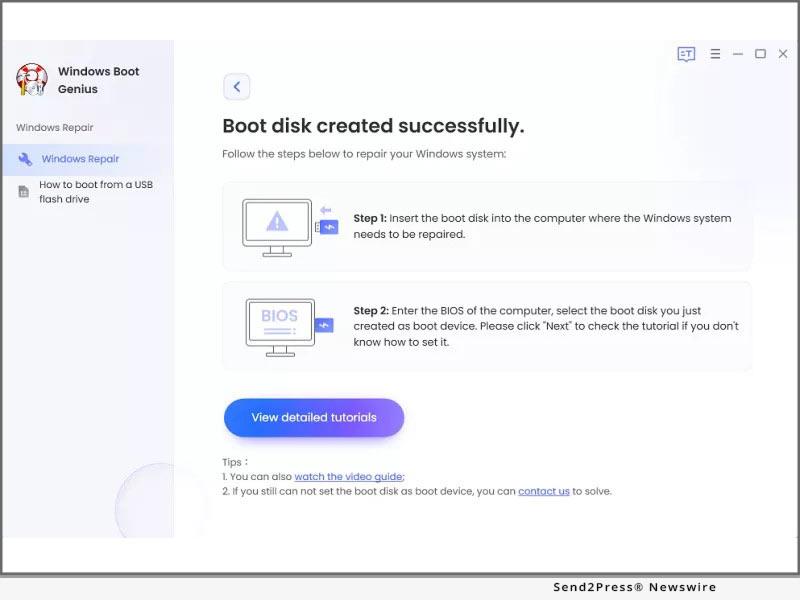
Booting from a CD or USB to repair a Windows can be tricky. However, Windows Boot Genius can help you repair it within 3 steps:
- Step 1: Launch Windows Boot Genius on your Windows and prepare a workable PC and a use to create a bootable disk.
- Step 2: After successfully make a bootable disk, connect the USB Flash drive to the computer and boot it from the bootable disk.
- Step 3: Then Windows Boot Genius will be launch automatically, follow the on-screen guide to repair Windows.
Windows Boot Genius is the most all-inclusive Windows utility in the market, covering everyday Windows actions, such as resetting passwords & product keys, data recovery, backup, and much more. It is designed with multiple functions and options to make it easy but also powerful for ordinary users and experts.
For more details, visit:
Follow on Social Media at:
Facebook:
Twitter:
YouTube:
Pinterest:
News Source: Tenorshare Co. Ltd.

Legal Disclaimer:
MENAFN provides the
information “as is” without warranty of any kind. We do not accept
any responsibility or liability for the accuracy, content, images,
videos, licenses, completeness, legality, or reliability of the information
contained in this article. If you have any complaints or copyright
issues related to this article, kindly contact the provider above.
Most popular stories
Market Research

More Story








Comments
No comment