








403
Sorry!!
Error! We're sorry, but the page you were looking for doesn't exist.
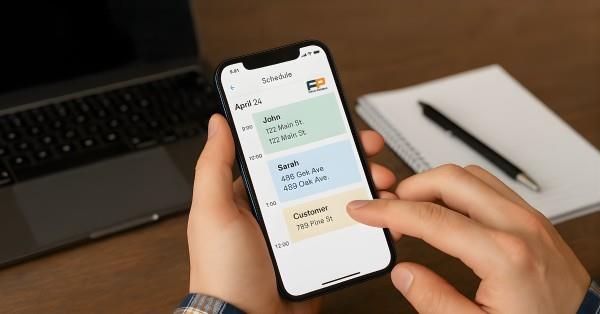
Field Promax Launches New Mobile App Interface
(MENAFN- ForPressRelease)
Field Promax Introduces All-New Mobile App Interface for Faster Scheduling and On-Site Reporting
Field Promax has released a new mobile app interface that is simple, fast, and easy for field teams to use. It helps technicians update jobs quickly and stay organized throughout the day. For HVAC, plumbing, electrical, and other service businesses, this update makes daily work smoother and less stressful.
Most technicians use their phones as their main work tool. A clean, easy-to-use app helps them find what they need right away. The new Field Promax interface gives them a simple layout that supports fast updates and clear job details.
Why This New Interface Matters
Field teams deal with many common problems, such as
1.Missing job notes
2. Slow or late updates
3. Confusion between office and field staff
4. Small mistakes that cause delays
The new Field Promax design fixes these issues by showing the most important information first. When technicians open the app, they can see their jobs, locations, and instructions right away. This helps the whole team stay on track.
Simple Navigation for Daily Tasks
The new navigation bar makes the app easy to use. It keeps important actions in one place. Technicians can quickly:
1.Read job details
2. Change job status
3. Add notes
4.Take and upload photos
They do not have to search through many screens. This saves time, especially when moving between jobs. It also helps the office team because they get updates faster.
Faster Scheduling and Dispatching
Scheduling can get busy and stressful. Calls come in, customers need help, and dispatchers must assign jobs fast.
1. With the new interface:
2. Jobs can be assigned in seconds
3. Technicians get updates right away
4. Same-day requests are easier to fit in
5. Double bookings are less likely
When these tools work with features like digital work orders, the full workflow becomes faster and clearer for everyone.
Quick and Clear Status Updates
Technicians can update job status with one tap. The app uses simple icons and colors to show what is happening.
For example, if a technician marks a job as delayed, the office sees it at once and can update the customer or adjust the plan. This helps the team avoid confusion and stay on schedule.
Easy On-Site Reporting
On-site reporting can take time. Technicians need to take photos, write notes, and collect signatures.
The new interface makes this easier. Technicians can:
1. Take photos inside the job card
2. Add short notes
3. Record parts used
4. Collect signatures without switching screens
This keeps reports clear and complete. The office team gets the information right away, which helps with billing and customer updates.
Better Map View for Travel
A good map saves time every day. The updated map view helps technicians see where they need to go next and follow the best route.
This helps teams:
1. Plan better routes
2. Reduce travel time
3. Support new technicians
4. Respond faster to urgent calls
Dispatchers can also plan schedules based on distance, which keeps the day running smoothly.
Easy for New Technicians to Learn
Some technicians prefer simple tools. The new Field Promax design is made for them. The icons and labels are clear, and the layout is easy to follow.
Most users can learn the app in minutes. This reduces training time and helps new hires feel comfortable right away. Business owners say their teams like tools that feel simple and familiar.
Helps Office and Field Teams Work Together
A good mobile app helps both the office and the field. The updated Field Promax interface improves:
Communication
1.Job accuracy
2. Real-time updates
3. Daily planning
With clear information, businesses can send invoices faster, answer customer questions on time, and plan better for the next day.
A Real Example from the Field
A small HVAC company with six technicians struggled with missed notes and unclear updates. After switching to the new interface, technicians updated jobs faster. Customer calls dropped because reports were clear and sent on time.
Many companies see the same results when using tools like Field Promax. A simple and clean layout helps teams work better and serve customers well.
User feedback highlights: ease of use, reliability in the field, and responsive support.
Final Thoughts
The new Field Promax mobile app interface is built to make work faster and easier. It helps technicians update jobs without delay, supports clear communication, and makes on-site reporting simple. For field service companies that want a smoother workday, this update brings real value.
With better navigation, faster scheduling, simple reporting tools, and smarter routes, the new design helps teams stay on time and serve customers with confidence. If you want to see how these updates work with features like field service scheduling. Field Promax offers a full system to support your business from start to finish.
Field Promax has released a new mobile app interface that is simple, fast, and easy for field teams to use. It helps technicians update jobs quickly and stay organized throughout the day. For HVAC, plumbing, electrical, and other service businesses, this update makes daily work smoother and less stressful.
Most technicians use their phones as their main work tool. A clean, easy-to-use app helps them find what they need right away. The new Field Promax interface gives them a simple layout that supports fast updates and clear job details.
Why This New Interface Matters
Field teams deal with many common problems, such as
1.Missing job notes
2. Slow or late updates
3. Confusion between office and field staff
4. Small mistakes that cause delays
The new Field Promax design fixes these issues by showing the most important information first. When technicians open the app, they can see their jobs, locations, and instructions right away. This helps the whole team stay on track.
Simple Navigation for Daily Tasks
The new navigation bar makes the app easy to use. It keeps important actions in one place. Technicians can quickly:
1.Read job details
2. Change job status
3. Add notes
4.Take and upload photos
They do not have to search through many screens. This saves time, especially when moving between jobs. It also helps the office team because they get updates faster.
Faster Scheduling and Dispatching
Scheduling can get busy and stressful. Calls come in, customers need help, and dispatchers must assign jobs fast.
1. With the new interface:
2. Jobs can be assigned in seconds
3. Technicians get updates right away
4. Same-day requests are easier to fit in
5. Double bookings are less likely
When these tools work with features like digital work orders, the full workflow becomes faster and clearer for everyone.
Quick and Clear Status Updates
Technicians can update job status with one tap. The app uses simple icons and colors to show what is happening.
For example, if a technician marks a job as delayed, the office sees it at once and can update the customer or adjust the plan. This helps the team avoid confusion and stay on schedule.
Easy On-Site Reporting
On-site reporting can take time. Technicians need to take photos, write notes, and collect signatures.
The new interface makes this easier. Technicians can:
1. Take photos inside the job card
2. Add short notes
3. Record parts used
4. Collect signatures without switching screens
This keeps reports clear and complete. The office team gets the information right away, which helps with billing and customer updates.
Better Map View for Travel
A good map saves time every day. The updated map view helps technicians see where they need to go next and follow the best route.
This helps teams:
1. Plan better routes
2. Reduce travel time
3. Support new technicians
4. Respond faster to urgent calls
Dispatchers can also plan schedules based on distance, which keeps the day running smoothly.
Easy for New Technicians to Learn
Some technicians prefer simple tools. The new Field Promax design is made for them. The icons and labels are clear, and the layout is easy to follow.
Most users can learn the app in minutes. This reduces training time and helps new hires feel comfortable right away. Business owners say their teams like tools that feel simple and familiar.
Helps Office and Field Teams Work Together
A good mobile app helps both the office and the field. The updated Field Promax interface improves:
Communication
1.Job accuracy
2. Real-time updates
3. Daily planning
With clear information, businesses can send invoices faster, answer customer questions on time, and plan better for the next day.
A Real Example from the Field
A small HVAC company with six technicians struggled with missed notes and unclear updates. After switching to the new interface, technicians updated jobs faster. Customer calls dropped because reports were clear and sent on time.
Many companies see the same results when using tools like Field Promax. A simple and clean layout helps teams work better and serve customers well.
User feedback highlights: ease of use, reliability in the field, and responsive support.
Final Thoughts
The new Field Promax mobile app interface is built to make work faster and easier. It helps technicians update jobs without delay, supports clear communication, and makes on-site reporting simple. For field service companies that want a smoother workday, this update brings real value.
With better navigation, faster scheduling, simple reporting tools, and smarter routes, the new design helps teams stay on time and serve customers with confidence. If you want to see how these updates work with features like field service scheduling. Field Promax offers a full system to support your business from start to finish.
Company:-Fieldpromax
User:- Field promax
Email:[email protected]
Phone:-8882499201
Url:-
Legal Disclaimer:
MENAFN provides the
information “as is” without warranty of any kind. We do not accept
any responsibility or liability for the accuracy, content, images,
videos, licenses, completeness, legality, or reliability of the information
contained in this article. If you have any complaints or copyright
issues related to this article, kindly contact the provider above.
Most popular stories
Market Research

More Story






Comments
No comment