




403
Sorry!!
Error! We're sorry, but the page you were looking for doesn't exist.
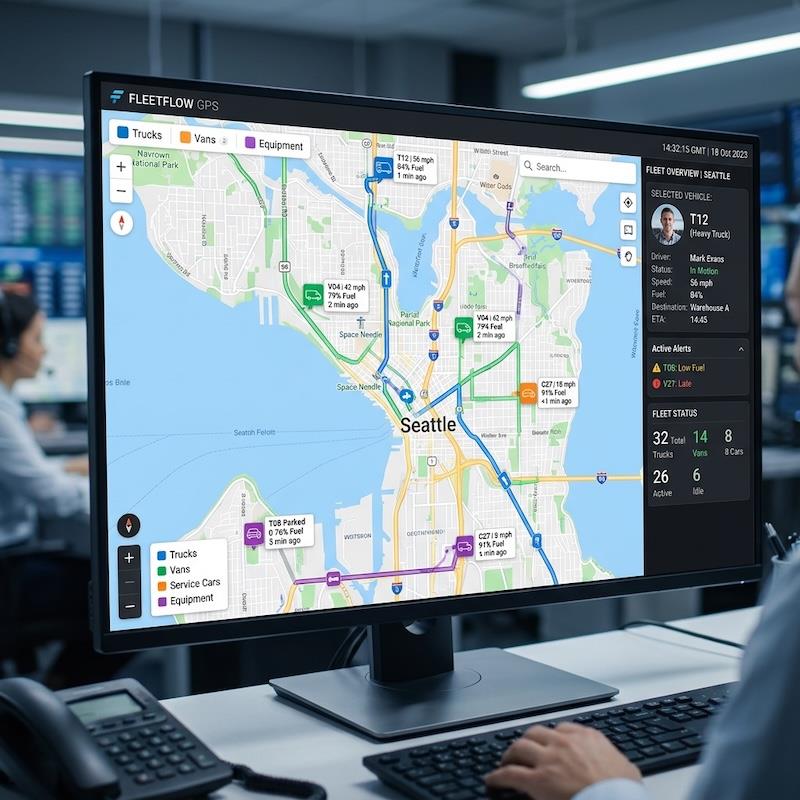
5 Best GPS Time Tracking Apps For Field Crews In 2026
(MENAFN- Robotics & Automation News) The best field crew time tracking apps with location verification in 2026 are Workyard, QuickBooks Time, BuddyPunch, Buildertrend, and Jibble.
-
Workyard ($6-13/user/month + base fee) is the strongest option for construction teams that need precise GPS verification and labor cost control.
QuickBooks Time ($8/user/month + base fee) excels at photo verification and payroll syncing for QuickBooks users.
BuddyPunch ($5.49/user/month + base fee) offers route playback and flexible clock-in methods.
Buildertrend provides time tracking inside a full construction project management system with custom pricing, while Jibble delivers a low-cost, geo-verified clock-in solution with a free plan.
Most tools fall between $3 and $15+ per user per month.
Why Field Crews Need Location-Verified Time TrackingConstruction and field service teams rarely stay in one place. Crews move between jobsites, travel long distances, and often work in areas with unreliable cellular coverage. When time is tracked manually – or without location verification – errors become common. These inaccuracies inflate payroll, create disputes, and reduce visibility into true labor costs.
Location-verified time tracking addresses these issues by linking work hours to real GPS data. These systems confirm that clock-ins occur at approved jobsites, automatically capture travel time, and create audit-ready records. For contractors, this accuracy is essential for payroll compliance, billing, and job costing.
This guide reviews five field-ready time tracking apps that offer varying levels of GPS verification, offline reliability, and construction-specific workflows.
How These Apps Were EvaluatedEach platform was reviewed using criteria relevant to mobile and construction crews:
-
GPS accuracy and background tracking reliability
Geofencing quality and clock-in enforcement
Anti–time theft tools such as photo or biometric verification
Mileage and travel-time capture
Offline performance with reliable data syncing
Payroll, accounting, or job-costing integrations
Ease of use for field workers and supervisors
Pricing transparency and trial availability
Based on these factors, Workyard earned the top ranking for construction-focused accuracy and automation.
1. Workyard What is Workyard?Workyard is a construction-first GPS time tracking and job costing platform built for crews that move between multiple jobsites each day.
It records exact clock-in and clock-out locations using high-accuracy GPS breadcrumb trails, even when employees work offline or in low-signal areas.
The system automatically captures travel time and mileage, records precise arrival and departure times, and assigns hours to the correct project and cost code.
While geofences can be used for reminders or restrictions, Workyard relies on continuous GPS tracking rather than simple geofence triggers to ensure accuracy.
Key features-
High-precision GPS breadcrumb trails with route playback
Automatic travel-time and mileage logging
Polygon geofencing with customizable clock-in rules
Job and cost-code assignment based on location
Live crew mapping and basic scheduling
Labor cost analysis and detailed audit trails
Payroll and accounting integrations, including QuickBooks
Offline tracking with photo attachments and manager controls
-
Starter: $6/user/month + $50 company base fee
Pro: $13/user/month + $50 company base fee
14-day free trial (no credit card required)
-
Extremely accurate GPS verification tied to real jobsite presence
Automatic travel and mileage capture reduces admin work
Strong payroll syncing and labor-cost visibility
-
Base fee may be costly for very small teams
Initial setup requires configuration of jobsites and cost codes
Continuous GPS tracking requires employee transparency
Workyard is ideal for construction and field service companies that need exact, verifiable GPS timestamps for payroll, billing, and labor-cost control across multiple active jobsites.
2. QuickBooks Time What is QuickBooks Time?QuickBooks Time (formerly TSheets) is a mature workforce time tracking solution offering mobile, web, and kiosk clock-ins. It includes GPS reminders, geofencing, photo verification, and native integration with QuickBooks Payroll and QuickBooks Online.
It is particularly well suited to companies already using QuickBooks that want dependable time tracking with minimal payroll friction.
Key features-
Mobile, web, and kiosk time clocks
GPS reminders and geofencing
Photo clock-in verification to prevent buddy punching
Job-based scheduling and shift planning
Custom reports, alerts, and project costing
Timesheet approvals and signatures
Native QuickBooks payroll integrations
-
Premium: $8/user/month + $10 base fee
Elite: $10/user/month + $20 base fee
30-day free trial
-
Excellent payroll integration for QuickBooks users
Multiple clock-in methods and verification tools
Strong scheduling and approval workflows
-
Base and per-user fees can add up
Construction-specific job costing is less robust than specialized platforms
QuickBooks Time works best for businesses that prioritize payroll integration and verification features and are already invested in the QuickBooks ecosystem.
3. BuddyPunch What is BuddyPunch?BuddyPunch is a crew-focused time tracking app offering flexible clock-in methods such as PINs, QR codes, passwords, photo capture, and fingerprint verification. It provides both basic GPS stamping and real-time GPS tracking with route playback.
The platform also includes scheduling tools and payroll exports, making it suitable for mobile teams that want route visibility and flexible clocking options.
Key features-
GPS stamping and real-time GPS route playback
Multiple clock-in methods (PIN, QR, facial recognition, password)
Drag-and-drop scheduling and group punch
PTO, overtime rules, and payroll integrations
Timesheet approvals and manager edits
-
Starter: $5.49/user/month + $19 base fee
Pro: $6.99/user/month + $19 base fee
Enterprise: $11.99/user/month + $19 base fee
14-day free trial
-
Strong route playback for travel visibility
Crew-friendly clock-in flexibility
Solid payroll export options
-
Real-time GPS depends on connectivity and plan level
Base fee may be inefficient for very small teams
Offline GPS tracking is weaker than construction-first tools
BuddyPunch is well suited for delivery teams, mobile service providers, and crews that value flexible clock-ins and route-level visibility.
4. Buildertrend What is Buildertrend?Buildertrend is a full construction project management platform that includes built-in GPS time tracking. It connects crew time directly to job phases, cost codes, schedules, and payroll exports.
Location verification is provided through geofencing and GPS stamping in daily logs rather than continuous breadcrumb tracking.
Key features-
Mobile GPS time clock with geofencing
Job costing by phase and cost code
Offline time entry with automatic sync
Scheduling, change orders, and project management tools
Payroll export integrations
Custom pricing only (demo available, no free trial)
Pros-
Deep integration between time tracking and project management
Designed specifically for construction workflows
Offline clocking for jobsites
-
No public pricing; higher cost for small firms
Steeper learning curve than standalone apps
GPS focuses on jobsite presence, not route tracking
Buildertrend is best for builders and general contractors who want time tracking embedded inside a full project management system.
5. Jibble What is Jibble?Jibble is a lightweight time tracking app designed for small teams that want affordable, geo-verified clock-ins. It includes GPS geofencing, facial recognition, photo verification, and offline tracking.
Key features-
GPS geofencing and location capture at clock-in
Facial recognition and photo verification
Offline time tracking with later sync
Automated timesheets with PTO and overtime tracking
Basic approvals and payroll exports
-
Free plan available
Premium: $3.49/user/month
Ultimate: $6.99/user/month
Enterprise: custom pricing
-
Low-cost plans and free tier
GPS and biometric verification
Offline-capable mobile app
-
Limited reporting and automation
Not designed for construction job costing
Advanced features require paid upgrades
Jibble is ideal for small field teams or startups needing basic GPS verification and identity controls without high costs.
Why Location Verification MattersLocation-verified time tracking helps field crews:
-
Prevent off-site clock-ins and time theft
Improve payroll accuracy and reduce disputes
Capture travel time and mileage automatically
Assign labor hours to the correct jobsite
Generate audit-ready records for billing and compliance
Improve supervision across distributed crews
The strongest field crew platforms share these capabilities:
-
GPS breadcrumb trails or reliable location stamps
Job and cost-code tagging
Automatic travel-time capture
Offline tracking with dependable syncing
Simple supervisor review and approval workflows
Payroll or accounting integrations
Easy-to-use mobile apps for field workers
Among the five platforms reviewed, Workyard delivers the most accurate and construction-focused solution for GPS-verified time tracking and labor cost control.
QuickBooks Time excels at payroll integration, BuddyPunch adds route playback and flexible clock-ins, Buildertrend integrates time tracking into full project management, and Jibble offers an affordable entry point for small teams.
Choosing the right time tracking app can significantly reduce payroll errors, improve compliance, and streamline jobsite management for field crews in 2026.

Legal Disclaimer:
MENAFN provides the
information “as is” without warranty of any kind. We do not accept
any responsibility or liability for the accuracy, content, images,
videos, licenses, completeness, legality, or reliability of the information
contained in this article. If you have any complaints or copyright
issues related to this article, kindly contact the provider above.
Most popular stories
Market Research

More Story








Comments
No comment