


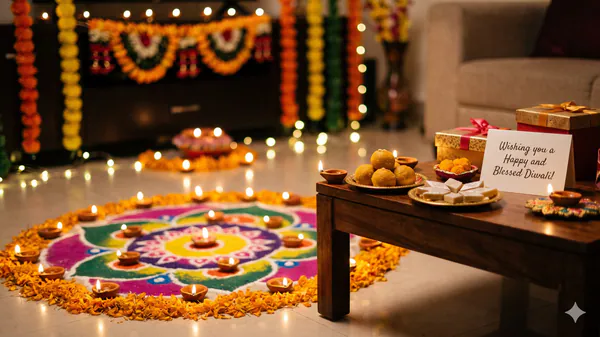
How To Make Diwali 2026 Images, Wishes, Greetings From Gemini AI To Send On Whatsapp: Online Pics Step-By-Step Guide


For those looking to send original messages to colleagues, friends, and family, AI tools like Google Gemini can be used to generate personalised texts and unique images.
Also Read | Gold prices today, 8 Nov: Check city-wise rates of 24K, 22K gold on Diwali 2026Here is a step-by-step guide to using the AI platform to craft bespoke Diwali greetings for your WhatsApp chats.
How to generate personalised Diwali text wishes?To create a customised text greeting, users must give the AI a clear, specific prompt about tone, recipient, and length.
Here's how you can generate personalised Diwali text wishes:
- Open the Google Gemini app on your smartphone or visit google on your browser and log in with your Google account. In the chat box, draft your prompt by typing exactly what you need. Instead of a basic "Give me a Diwali wish," be specific. For example: "Write a warm, 50-word Diwali wish for my colleagues, wishing them prosperity and success in the coming year." If the first result is too formal or too casual, you can ask Gemini to "make it funnier," "translate it into Hindi," or "make it sound more poetic." Once you are satisfied with the text, click the copy icon beneath the response, open WhatsApp, and paste it into your desired chat.
Custom Prompt:“Write a 40-word, professional Diwali wish for my client, thanking them for their partnership and wishing them and their team success, peace, and prosperity.”
Result:“Wishing you, your family, and the entire team a very Happy and Prosperous Diwali! Thank you for your continued partnership and trust. May this festival of lights bring new opportunities, success, and peace to your endeavours. Have a joyful celebration! ✨”
How to create AI-generated Diwali images?Gemini can create vibrant, high-resolution visual greetings that make your Diwali wishes stand out in crowded WhatsApp feeds.
- In the same chat box, explicitly ask Gemini to generate an image. Use descriptive keywords detailing the setting, lighting, and elements you want included. A prompt like "Generate a realistic, vibrant image of a traditional Indian courtyard lit up with hundreds of clay diyas, decorated with orange marigold flowers under a starry night sky" yields far better results than just "Diwali image." Gemini will typically generate a few variations. Tap on the image you like best to view it in full screen, then click the download icon to save it to your device's gallery. Open WhatsApp, tap the attachment icon in your chat, select the downloaded image from your gallery, and paste your generated text wish into the caption box before hitting send.
Combine your text and image prompts to match themes. If you generate a modern, minimalist digital Diwali card, pair it with a crisp, contemporary text wish.
By experimenting with different prompts, you can ensure that every family member, friend, and colleague receives a completely original greeting this festive season.

Legal Disclaimer:
MENAFN provides the
information “as is” without warranty of any kind. We do not accept any
responsibility or liability for the accuracy, content, images, videos,
licenses, completeness, legality, or reliability of the information
contained in this article. If you have any complaints or copyright issues
related to this article, kindly contact the provider above.


Comments
No comment