

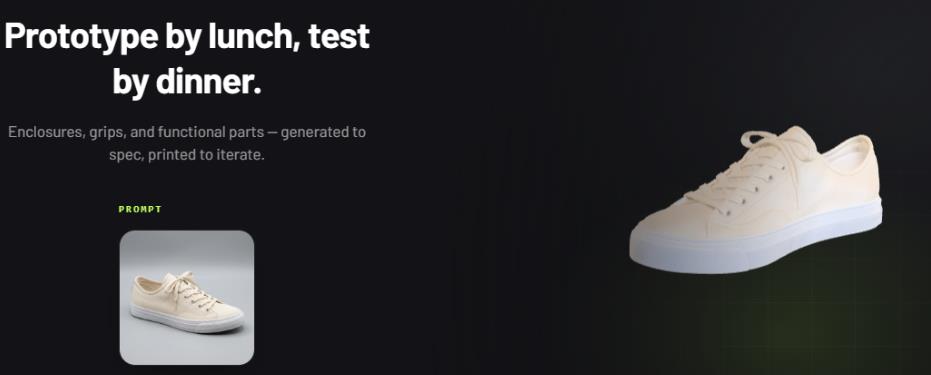
How AI Is Changing Image-To-3D Model Creation


Traditionally, bridging that gap meant opening specialized modeling software, building geometry piece by piece, and spending hours refining details. AI is changing that workflow by allowing a single image to become a starting point for a usable 3D asset.
Meshy is one of the leading AI 3D model generators, giving creators a browser-based way to move from an idea or reference image to a 3D model.
Its Image to 3D feature can turn a photo, sketch, or piece of concept art into a textured model without requiring traditional 3D modeling expertise.
The platform also supports text-based 3D generation, AI texturing, auto-rigging, image generation, and other tools for people working across digital and physical 3D projects.
What is Image to 3D?Image to 3D is an AI-assisted process that interprets visual information in a 2D picture and uses it to construct three-dimensional geometry.
Instead of manually deciding where every vertex, edge, and surface should go, the AI analyzes the reference and creates a model based on what it can infer from the image.
Meshy lets users upload an image directly through a web browser. The platform currently supports PNG, JPG, JPEG, and WebP images for its Image to 3D workflow, with an individual upload limit of 20 MB. After uploading an image, the user can generate a textured 3D model and then inspect or download the result.
This approach can be useful when the goal is not to reproduce an object through traditional modeling from scratch, but to quickly create a workable digital representation that can be refined later.
How Meshy Turns an Image into a 3D Model Step 1: Start With a ReferenceThe quality of the reference image has a direct effect on what an AI system can understand. A clear image with the subject visible against a relatively simple background generally gives the model more useful information.
The source does not have to be a professionally photographed product. Meshy describes its workflow as suitable for photos, sketches, and concept art, which makes the feature relevant to both practical projects and early creative experimentation.
Step 2: Let AI Build the ModelOnce the image is uploaded, Meshy processes the visual information and generates the 3D asset. The platform says its Image to 3D workflow can produce a fully textured model in about a minute, giving creators a much faster starting point than building an equivalent object manually.
This does not mean every generated model will be perfect on the first attempt. AI reconstruction still involves interpretation, particularly when parts of an object are hidden from the camera.
The generated model should therefore be treated as an asset that can be reviewed and refined rather than as an automatic replacement for every professional modeling workflow.
Step 3: Choose How Much Visual Information to ProvideOne of the more useful features is the ability to work with multiple images. Instead of relying entirely on one viewpoint, users can provide images of the same object from different angles.
Meshy's multi-image workflow supports up to four images of one object. Additional viewpoints can provide the AI with information about sides, backs, proportions, and details that cannot be seen in a single photograph.
The API documentation also confirms support for one to four images and recommends showing the same object from different angles for the best results.
For example, imagine trying to recreate a decorative chair from one front-facing photograph. The seat may be clear, but the back, legs, and side details could be partially hidden. Several reference images give the reconstruction process more information to work with.
Why Multi-Image Input Can Make a DifferenceA single photograph contains incomplete information. You can see only the surfaces facing the camera, so an AI model has to make educated predictions about everything else.
Multiple images reduce that uncertainty. If you photograph a product from the front, side, rear, and another angle, the system has more visual evidence for constructing the overall shape.
This can be particularly useful for product visualization, collectible objects, props, furniture, and other subjects where the appearance from different directions matters.
Meshy also provides a batch workflow in which up to 10 different images can be used to create 10 separate models, which can be useful when handling larger collections of assets.
For anyone comparing AI tools, a photo-to-3D generator that supports both single-image and multi-image workflows can be more flexible than one limited to a single reference.
Where AI-Generated 3D Models Can Be Used Game DevelopmentGame creators often need large numbers of 3D assets, including props, environmental objects, characters, and decorative elements. Creating every asset manually can slow down early development.
Meshy supports game-development workflows and provides tools such as Smart Topology for producing lower-polygon meshes. Its generated assets can be exported for use with applications and engines such as Unity, Unreal Engine, Blender, Godot, and Maya.
AI generation can therefore be especially useful during prototyping, when developers need to test an idea before investing time in detailed manual modeling.
Product PrototypingA product photograph can become a useful starting point for visualization. Designers can generate a model to discuss an idea, prepare a presentation, create an interactive preview, or explore how an object could appear in a digital environment.
The model may still require professional CAD work when exact engineering dimensions are necessary, but AI can shorten the distance between a visual reference and a 3D concept.
3D PrintingAI-generated models can also move into physical production. Meshy supports formats such as STL and 3MF that are commonly associated with 3D-printing workflows.
Its website specifically positions Image to 3D for printing applications and says generated files can be used with slicers such as Bambu Studio, OrcaSlicer, and Creality Print.
Before printing, however, it is still sensible to inspect the mesh, scale, geometry, and wall thickness. A visually convincing model is not automatically guaranteed to be mechanically suitable for printing.
More Than Image GenerationMeshy is not limited to converting pictures into models. It offers both text and image generation modes, allowing users to approach 3D creation from different directions.
A creator with a reference picture can use Image to 3D, while someone starting with only a written description can use Text to 3D.
The platform also includes AI texturing, auto-rigging, AI image generation, and other 3D-focused capabilities. That broader collection can be useful when a project moves beyond simply creating a mesh.
Another practical advantage is that Meshy is fully browser-based. There is no requirement to install specialized 3D software just to begin generating a model. The platform states that users can generate models directly in the browser without downloading software or plugins.
Exporting the Finished ModelGetting a model out of an AI platform matters just as much as generating it. Meshy supports a broad selection of export formats, including GLB, OBJ, FBX, STL, USDZ, and other formats depending on the workflow.
That flexibility makes it easier to move an asset between different stages of a project. A game developer may prefer one format, while someone preparing a physical print may need another.
Meshy also provides a free browser-based 3D tool suite that includes tools such as a converter, online viewer, and STL repair functionality. This gives users options for handling or checking 3D files without immediately turning to separate desktop applications.
Can Developers Integrate Meshy?Yes. Meshy provides developer API access for integrating its AI 3D generation capabilities into applications and production pipelines.
Its API documentation includes dedicated Image to 3D and Multi-Image to 3D endpoints, allowing developers to submit images programmatically and retrieve generated 3D assets.
This matters for teams that need more than occasional manual generation. An application could potentially incorporate AI model creation into a larger workflow rather than requiring users to switch between different services.
Does Meshy Have a Free Option?Meshy offers a free tier, making it possible to experiment with AI-based 3D generation without immediately committing to a paid plan. Usage is credit-based, and the amount of generation available depends on the applicable plan and operation. Meshy's API pricing documentation also lists credit costs for different generation and processing tasks.
For someone exploring image-to-3D for the first time, a free option can make it easier to test different reference images and understand where AI-generated assets fit into an existing workflow.
Frequently Asked Questions Is Image to 3D the same as traditional 3D modeling?No. Traditional modeling gives the artist direct control over the geometry from the beginning. Image to 3D uses AI to interpret a reference and automatically create a model. The generated asset can then be inspected and refined as needed.
Is one image enough to create a 3D model?One image can be enough for a starting point, particularly when the subject is relatively simple or its visible shape provides sufficient information. For more accurate reconstruction, multiple views can provide additional information. Meshy supports up to four images in its Multi-Image to 3D workflow.
Can Meshy models be used for 3D printing?Yes. Meshy supports 3D-printing workflows and provides exports including STL and 3MF. However, generated geometry should still be checked before printing to make sure it meets the requirements of the intended physical object.
Does using Meshy require 3D modeling experience?No specialized 3D expertise is required to start its browser-based Image to 3D workflow. Users can upload an image and generate a model through the platform, although additional modeling knowledge can still be valuable when refining the result for professional production.
The Future of Image-Based 3D CreationAI is making 3D creation more accessible by changing the starting point. Instead of opening a complex modeling application with a blank scene, creators can begin with something they already have: a photograph, sketch, concept, or written idea.
Meshy's combination of image-to-3D, multi-image input, text-to-3D, AI texturing, export options, free tools, and developer API access shows how these workflows are moving toward a more connected creation process.
For hobbyists, designers, developers, and 3D-printing enthusiasts, the biggest benefit may simply be having a faster way to turn visual ideas into something you can actually inspect, modify, and use.

Legal Disclaimer:
MENAFN provides the
information “as is” without warranty of any kind. We do not accept any
responsibility or liability for the accuracy, content, images, videos,
licenses, completeness, legality, or reliability of the information
contained in this article. If you have any complaints or copyright issues
related to this article, kindly contact the provider above.
Comments
No comment