(MENAFN- Mid-East Info)
A phishing attack is a digital scam in which cybercriminals impersonate a trusted person, company, or service to trick victims into revealing sensitive information, clicking malicious links, downloading harmful files, or making fraudulent payments.
From email phishing scams and fake websites to SMS messages and social media impersonation, phishing attacks exploit one thing above all: trust.
For businesses, the risk extends beyond stolen credentials. A phishing scam that impersonates a recognizable brand can also lead to brand infringement, customer fraud, reputational damage, and loss of customer trust.
What Is a Phishing Attack?
A phishing attack is a type of social engineering attack that uses deception to manipulate a person into taking an unsafe action.
Attackers commonly impersonate banks, e-commerce platforms, technology companies, telecom providers, delivery services, or even employees and executives. Their messages are designed to look legitimate and often create a sense of urgency.
For example:
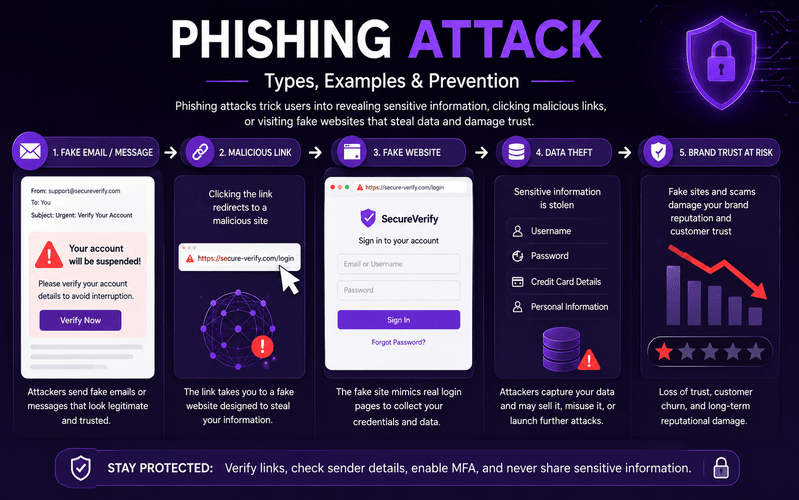
The message may contain a link to a fake website that looks almost identical to the legitimate brand website. If the victim enters their username, password, card information, or other personal details, the attacker can capture that information.
How Does an Email Phishing Attack Work?
A typical email phishing attack follows four stages:
1. The Bait
The attacker sends an email, SMS, social media message, or other communication that appears to come from a trusted source.
2. The Pressure
The message creates urgency or fear, such as:
Your account will be blocked
Your payment has failed
Your subscription is expiring
Your package could not be delivered
Your security information needs verification
3. The Trap
The victim is encouraged to click a link, open an attachment, respond with information, or visit a fraudulent website.
4. The Compromise
The attacker may steal credentials, payment information, personal data, or use the compromised account for further attacks.
What Are the Types of Phishing Attacks?
There are several types of phishing attacks, and attackers often combine multiple techniques within the same campaign.
| Type |
How It Works |
| Email Phishing |
Mass fraudulent emails designed to trick recipients into clicking links or sharing information. |
| Spear Phishing |
Highly targeted phishing directed at a specific individual or organization. |
| Whaling |
Targets senior executives or high-value individuals. |
| Smishing |
Phishing delivered through SMS or messaging platforms. |
| Vishing |
Uses fraudulent phone calls to obtain sensitive information. |
| Clone Phishing |
Copies a legitimate message and replaces its link or attachment with a malicious one. |
| Pharming |
Redirects users toward fraudulent websites, often without relying on a conventional phishing message. |
| Angler Phishing |
Uses fake social media accounts or customer-support identities to target users. |
| Quishing |
Uses malicious QR codes to redirect users to fraudulent websites. |
| Social Media Phishing |
Uses fake profiles, messages, advertisements, or pages to deceive users. |
| Business Email Compromise |
Impersonates executives, employees, suppliers, or business partners to manipulate organizations into making payments or sharing information. |
Common Phishing Attack Techniques
Understanding
phishing techniques makes suspicious activity easier to identify.
Lookalike Domains
Attackers register domains that resemble legitimate domains by changing letters, adding words, or using similar-looking characters.
Fake Login Pages
A fraudulent login page may copy the design of a well-known service to capture usernames and passwords.
Email Spoofing
Attackers manipulate email information to make a message appear to originate from a trusted sender.
Malicious Links
A link may appear legitimate while redirecting the victim to a fraudulent website.
Social Engineering
Instead of relying only on technical vulnerabilities, attackers manipulate emotions such as fear, urgency, curiosity, or trust.
Brand Impersonation
Attackers may copy a company's name, logo, website design, social identity, or customer-support persona to make a phishing scam appear authentic.
Phishing Attack Examples
Phishing scams can target almost any digital interaction.
Bank Phishing
A victim receives a message claiming that suspicious activity has been detected on their bank account and is asked to“verify” their credentials.
E-commerce Phishing
A fake delivery or order-confirmation message directs a customer to a fraudulent payment or tracking page.
Fake Customer Support
An attacker creates a fake customer-care account and contacts customers who are publicly asking for help on social media.
Account Verification Scam
A message claims that a user's account needs immediate verification and provides a link to a fake login page.
Brand Impersonation Phishing
A fraudulent website or social account copies a legitimate brand's identity and uses it to deceive customers.
This last category is particularly important for businesses because the attack can affect
both the customer and the brand being impersonated.
How to Identify a Phishing Attack
Before clicking a link or sharing information, look for these warning signs:
An unexpected message asking for sensitive information
A suspicious sender address or phone number
A misspelled or unusual domain
A message creating extreme urgency
A request for passwords, OTPs, card details, or other confidential information
Unexpected attachments
Links that do not match the claimed destination
Poor grammar or unusual formatting
Offers that appear too good to be true
Requests to make payments through unusual channels
Remember:
HTTPS alone does not prove that a website is legitimate. A phishing website can also use HTTPS.
How to Prevent Phishing Attacks
Effective
phishing attack prevention requires both user awareness and technical controls.
Verify Before You Click
Check the actual sender and destination URL before interacting with a suspicious message.
Visit Websites Directly
Instead of clicking an unexpected link, open the official website or application yourself.
Enable Multi-Factor Authentication
MFA adds another layer of security if a password is compromised.
Avoid Unexpected Attachments
Do not open files from unknown or unexpected sources without verifying them first.
Verify Payment Requests
For business payments or account changes, independently confirm the request with the relevant person or organization.
Train Employees
Regular security awareness training can help employees recognize phishing techniques and social-engineering attempts.
Monitor Brand Impersonation
Businesses should also monitor the external digital ecosystem for fake websites, domains, social profiles, and other unauthorized uses of their brand identity.
What Should You Do If You Click a Phishing Link?
If you suspect that you have interacted with a phishing scam:
Stop entering additional information.
Close the suspicious page.
Change compromised passwords immediately.
Enable MFA where available.
Contact your bank or relevant service provider if financial information was exposed.
Report the phishing message or website.
If the incident involves a business account, notify your security or IT team.
Monitor the affected account for suspicious activity.
The faster a phishing incident is identified, the sooner additional damage can be limited.
Phishing vs. Spoofing vs. Brand Impersonation
These terms are related but not identical.
| Threat |
Meaning |
| Phishing |
Uses deception to trick a victim into taking an action or revealing information. |
| Spoofing |
Makes an identity, sender, domain, or communication appear to come from a trusted source. |
| Brand Impersonation |
Unauthorized use of a brand's identity to deceive customers or other audiences. |
A single campaign can involve all three-for example, an attacker can
spoof a brand identity, create a fake website, and use it in a phishing campaign.
Phishing Attacks Are Also a Brand Protection Problem
For businesses, phishing does not always begin inside the corporate network.
It can start with an attacker impersonating the brand externally:
Attacker → Brand Impersonation → Fake Digital Asset → Customer Targeting → Information Theft → Brand Trust Damage
Fraudulent websites, fake social media profiles, phishing domains, counterfeit digital properties, and fake customer-support accounts can all misuse a brand's identity.
This is why modern
phishing protection for businesses should consider not only what enters the organization's network, but also
how the brand is being represented across the wider digital ecosystem.
How mFilterIt Helps With Digital Brand Protection
mFilterIt's
brand protection approach focuses on identifying unauthorized and potentially harmful uses of a brand across digital channels.
Instead of waiting for customers to report a fake website or impersonating account, brands can use proactive monitoring to identify potential digital threats and investigate suspicious brand usage.
This can help businesses monitor areas such as:
Brand impersonation
Fake websites
Suspicious domains
Fake social media profiles
Unauthorized brand usage
Fraudulent customer-support identities
Other forms of brand infringement
For organizations where customer trust is directly connected to their digital identity, detecting unauthorized brand usage can become an important part of a broader fraud and brand-protection strategy.
Frequently Asked Questions
What is a phishing attack?
A phishing attack is a deceptive attempt to impersonate a trusted source and manipulate a victim into revealing sensitive information, clicking a malicious link, downloading a harmful file, or performing another unsafe action.
What are the main types of phishing attacks?
Common types include email phishing, spear phishing, whaling, smishing, vishing, clone phishing, pharming, angler phishing, and QR-code phishing.
What are some phishing attack examples?
Common examples include fake bank alerts, fraudulent delivery messages, account-verification emails, fake customer-support accounts, and websites impersonating trusted brands.
How can I prevent phishing attacks?
Verify senders, inspect URLs, avoid unexpected links and attachments, use MFA, verify payment requests independently, keep software updated, and report suspicious communications.
What is phishing protection?
Phishing protection refers to the combination of security controls, user awareness, monitoring, detection, and response measures used to reduce the risk and impact of phishing attacks.
Can phishing damage a brand?
Yes. When attackers impersonate a recognizable brand, customers may associate the fraudulent activity with the legitimate company. This can result in financial loss, customer distrust, complaints, and reputational damage.
How does brand impersonation relate to phishing?
Brand impersonation can be used as part of a phishing campaign. Attackers may copy a brand's identity, create fraudulent digital assets, and use them to deceive customers.
Conclusion
A phishing attack is ultimately an attack on
trust. Whether it arrives through email, SMS, phone calls, social media, or a fake website, the goal is to make a fraudulent interaction appear legitimate.
For individuals, strong security habits and awareness can reduce exposure. For businesses, protection needs to extend beyond internal systems to the external digital environment where brand impersonation and brand infringement can occur.
By combining phishing awareness with proactive brand protection and digital monitoring, organizations can identify unauthorized brand usage earlier and take action before fraudulent digital properties cause greater harm.
MENAFN31082026005446012082ID1111599675








Comments
No comment